How to Turn Google Review Mentions Into DoorDash Menu Sales
Google reviews are one of the most overlooked menu research tools a restaurant has.
Most owners read reviews to see whether customers are happy.
Smart owners read reviews to see what customers are already selling for them.
Because buried inside those reviews are clues about what people remember, what they recommend, what they crave again, and what they are most likely to order if you make it easier.
If customers keep mentioning your chicken parm, rice balls, birria tacos, buffalo chicken pizza, garlic knots, or homemade soups, that is not just a compliment.
That is demand.
And if those items are hard to find, poorly described, missing photos, or not featured properly on your DoorDash menu, you may be leaving easy orders on the table.
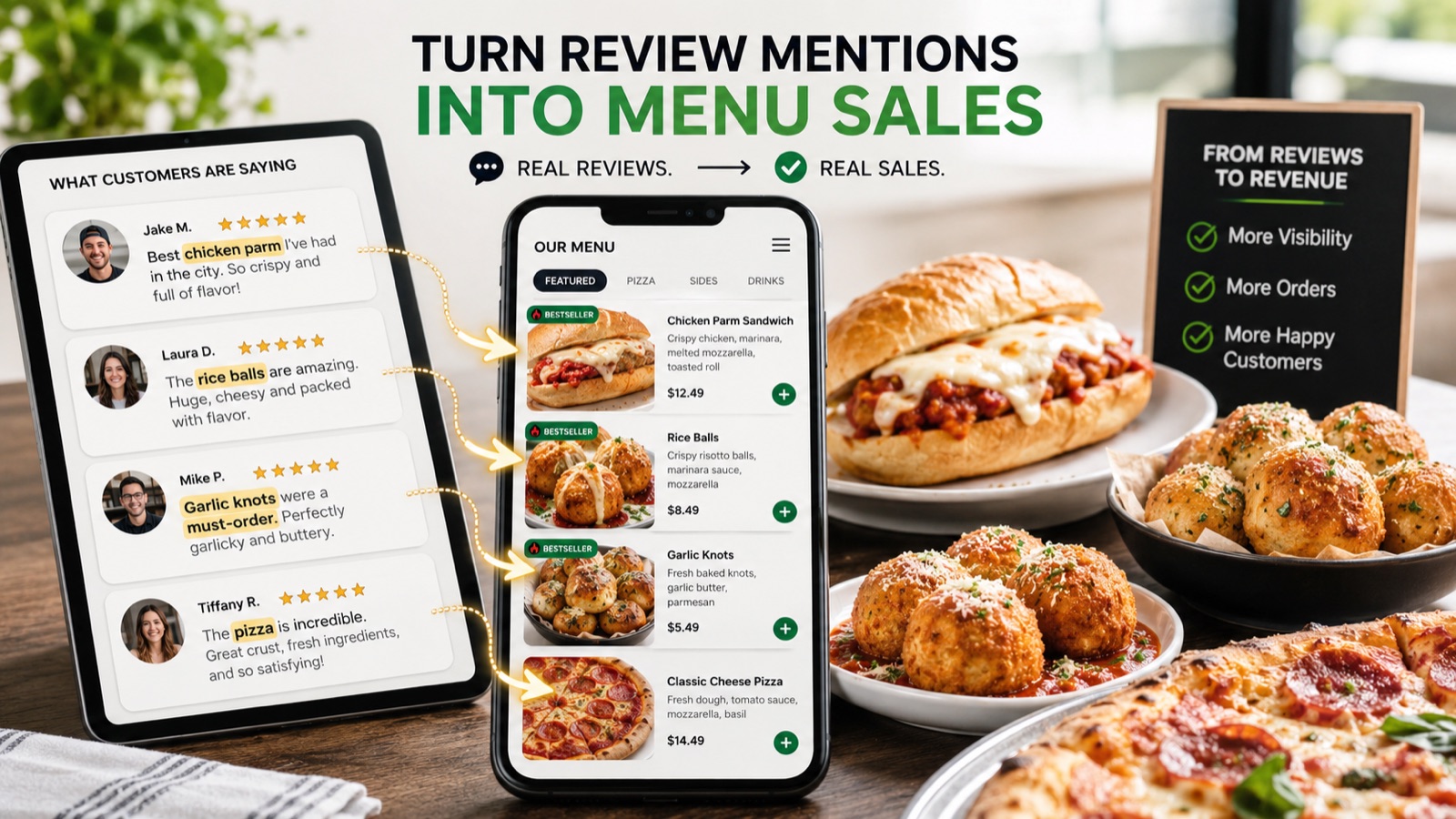
Your Customers Are Telling You What to Feature
Restaurant owners often guess which items should get the most attention on delivery apps.
They usually feature what they personally like, what has the highest margin, or what has always been popular in-store.
That matters, but there is another signal that is incredibly useful:
What do customers mention by name?
When someone writes:
"Best meatball parm I've had in years."
Or:
"The rice balls are insane."
Or:
"We come here every weekend for the cheesesteaks."
They are doing more than leaving feedback. They are telling future customers what to order.
The problem is that many restaurants do not connect that review data back to their DoorDash menu.
So the item gets praised publicly, but when a hungry customer opens the delivery menu, the same item may be buried, missing a photo, listed under a vague category, or described with two words.
That is a missed opportunity.
Review Mentions Reduce Ordering Friction
A good DoorDash menu should make ordering feel easy.
Customers should not have to think too hard. They should quickly understand what looks good, what is popular, and what feels safe to order.
Google review mentions help with that because they create confidence.
When an item is mentioned again and again in reviews, it has social proof. People have already bought it, eaten it, and cared enough to talk about it.
That means the item deserves stronger treatment on your delivery menu.
At minimum, frequently mentioned items should have:
- A clear item name
- A strong photo
- A better description
- Smart add-ons
- Placement in the right category
- Consideration for bundles or combos
If customers are already talking about it, your menu should be built to capture that demand.
Step 1: Search Your Reviews for Menu Items
Start simple.
Open your Google reviews and look for repeated food mentions. You do not need fancy software to begin. Just scan the reviews and write down every item customers mention by name.
Look for patterns like:
- Specific dishes
- Sauces
- Sides
- Desserts
- Drinks
- Specials
- Portion size comments
- "Best in town" comments
- "Must try" comments
- Items people say they came back for
Do not only look at five-star reviews.
Sometimes three- and four-star reviews still contain useful menu intelligence.
For example:
"The burger was great, but I wish I had known it came with fries."
That could mean the item description is unclear.
Or:
"The wings were amazing, but I didn't see extra sauce as an option."
That could point to a missing modifier.
Or:
"Love the chicken cutlet sandwich. Wish it was available on delivery."
That one is obvious.
If people mention an item and it is not easy to order online, fix that first.
Step 2: Count the Repeats
You are not looking for one random mention.
You are looking for repeated demand.
If one customer mentions a dish, that is useful. If ten, twenty, or fifty customers mention it, that item deserves attention.
Create a simple list:
| Item | Review Mentions | DoorDash Status |
|---|---|---|
| Chicken Parm | 18 | Listed, no photo |
| Rice Balls | 20 | Not listed |
| Meatball Parm | 14 | Listed, weak description |
| Garlic Knots | 11 | Listed, buried under sides |
| Tiramisu | 8 | Not listed |
This gives you a clear priority list.
The items with the most mentions should usually be among the first items you improve on DoorDash.
Not always because they are the highest-margin items. Because they already have customer pull.
Step 3: Check Whether Those Items Are Easy to Find on DoorDash
Once you have your review-mentioned items, open your DoorDash menu like a customer.
Do not look at it like the owner. Look at it like someone who has never ordered from you before.
Ask:
- Can I find this item quickly?
- Is it in the right category?
- Does the name make sense?
- Does it have a photo?
- Does the description make me want it?
- Can I add extras?
- Can I turn it into a meal?
- Is there a better version I should be offering?
This is where many menus break down.
A restaurant may have an item customers love, but on DoorDash it looks like this:
Before:
Rice Balls
No photo. No description. Buried under "Appetizers."
That does not sell.
A better version would be:
After:
Homemade Rice Balls
Crispy golden rice balls stuffed with seasoned beef, peas, and mozzarella, served with a side of marinara.
Then add:
- Extra marinara
- Add melted mozzarella
- Make it a 4-pack
- Add side salad
- Add drink
Now the item has a better chance of becoming a real delivery performer.
Step 4: Add Photos to the Review Favorites First
You do not need to photograph your entire menu in one day.
Start with the items customers already talk about.
If a dish has repeated Google review mentions, it should probably have a DoorDash photo.
Photos matter because customers eat with their eyes, especially on delivery apps. When someone is scrolling through a long menu, an item with a strong photo has a much better chance of getting noticed than a plain text listing.
Review favorites are the best place to start because they already have proof behind them.
A good rule:
Photograph your top 10 most-mentioned review items before worrying about the rest of the menu.
That gives you the highest-impact starting point.
Step 5: Use Review Language in Your Descriptions
Customers often describe your food in a more natural way than you do.
Restaurant menus tend to say:
Chicken Parm Sandwich
Chicken parm on a roll.
Customers say:
"Huge chicken parm sandwich with crispy cutlet, melted cheese, and great sauce."
That review language is useful.
You do not need to copy reviews word for word, but you can use the same selling points.
Better description:
Chicken Parm Sandwich
Crispy breaded chicken cutlet topped with marinara and melted mozzarella on a toasted roll.
That sounds more appetizing, more specific, and more orderable.
Look for words customers use repeatedly:
- Crispy
- Fresh
- Huge
- Homemade
- Spicy
- Creamy
- Loaded
- Tender
- Cheesy
- Perfectly cooked
- Best around
These words tell you what people actually care about.
Use that language to make your DoorDash descriptions stronger.
Step 6: Turn Frequently Mentioned Items Into Bundles
If customers love an item, make it easier to order a full meal around it.
A review-mentioned item can often become the anchor for a bundle.
Examples:
- Chicken Parm Dinner Bundle — Chicken parm, side salad, garlic knots, and a drink.
- Rice Ball Starter Pack — Rice balls, marinara, and mozzarella sticks.
- Cheesesteak Combo — Cheesesteak, fries, and a fountain drink.
- Family Pizza Night Bundle — Large pizza, wings, garlic knots, and 2-liter soda.
Bundles work because they reduce decision-making.
Instead of asking the customer to build the order from scratch, you give them an easy path to a higher-value cart.
This is especially useful on delivery apps, where customers are often ordering for families, groups, offices, or late-night cravings.
If an item gets mentioned often in reviews, ask:
What naturally goes with this?
That answer may become your next best bundle.
Step 7: Add Smart Modifiers Based on Review Clues
Reviews can also reveal missing add-ons.
Look for comments like:
- "Loved the spicy sauce"
- "Extra cheese made it perfect"
- "The garlic aioli is amazing"
- "Wish I ordered more dressing"
- "The bread was great"
- "The side of vodka sauce was the best part"
Those are modifier opportunities.
If people mention sauces, toppings, sides, or upgrades, make sure customers can add them on DoorDash.
For wings:
- Extra blue cheese
- Extra ranch
- Extra sauce
- Celery and carrots
- Make it extra crispy
For sandwiches:
- Add long hots
- Add extra cheese
- Add bacon
- Add fries
- Add side of sauce
For pizza:
- Extra cheese
- Add pepperoni
- Add hot honey
- Add garlic dipping sauce
- Add side salad
For pasta:
- Add chicken
- Add shrimp
- Add meatballs
- Add garlic bread
- Add extra sauce
These small add-ons can increase average order value without adding much complexity.
Step 8: Feature the Items Customers Already Recommend
If customers repeatedly say an item is great, do not hide it. Feature it.
That may mean:
- Moving it higher in its category
- Adding it to a "Most Popular" section
- Including it in a combo
- Using it as a featured item
- Making sure it has a strong photo
- Mentioning "customer favorite" in the description where appropriate
For example:
Customer Favorite: Meatball Parm Sandwich
House-made meatballs, marinara, and melted mozzarella on a toasted roll.
You do not need to overdo it. But when an item has real customer demand, give it the menu placement it deserves.
Step 9: Look for Items People Love That Are Missing From Delivery
This is one of the easiest wins.
Sometimes an item shows up repeatedly in Google reviews but is not on DoorDash at all.
That can happen for a few reasons:
- It was added in-store but never added online
- It was a special that became popular
- The owner forgot to update the delivery menu
- The item is listed under a different name
- The item is available but hidden in a confusing category
When this happens, customers may already want to order something that your delivery menu does not let them buy.
That is a direct revenue leak.
If your reviews mention an item that is missing from DoorDash, you should either add it, explain why it is not delivery-friendly, or create a delivery-friendly version of it.
For example, if a delicate item does not travel well, you might create a modified version for takeout.
The point is not to blindly add everything. The point is to use real customer demand to decide what deserves attention.
Step 10: Repeat This Every Month
Your reviews are not static.
New dishes get mentioned. Seasonal items pop up. Specials become favorites. Customer preferences shift.
A simple monthly review check can reveal what should change on your delivery menu.
Once a month, look for:
- New items being mentioned
- Items getting more praise than before
- Complaints about missing options
- Confusion about what comes with an item
- Requests for extras or modifications
- Positive mentions of sides, sauces, or desserts
Then update your DoorDash menu based on what you find.
This is not a huge project. It is a simple habit that can keep your delivery menu aligned with what customers actually want.
Example: Turning Review Mentions Into Menu Improvements
Let's say a pizza shop has these repeated Google review mentions:
- Garlic knots
- Chicken bacon ranch pizza
- Buffalo chicken cheesesteak
- Vodka sauce
- Cannoli
Now look at the DoorDash menu.
- The garlic knots have no photo.
- The chicken bacon ranch pizza is buried under specialty pies.
- The buffalo chicken cheesesteak has a weak description.
- Vodka sauce is not available as an add-on.
- Cannoli is missing from the delivery menu.
That creates five clear actions:
- Add a strong photo to garlic knots.
- Move chicken bacon ranch pizza higher in the specialty pizza section.
- Rewrite the buffalo chicken cheesesteak description.
- Add vodka sauce as a paid side modifier.
- Add cannoli to the dessert section.
None of this requires guessing.
The customers already told you what matters. The menu just needs to catch up.
Your Reviews Are a Sales Map
Google reviews are not just reputation management. They are a map of what customers already love.
When you connect that map to your DoorDash menu, you can make better decisions about photos, descriptions, bundles, add-ons, and item placement.
The best part is that this does not require a full rebrand, new equipment, or a complete menu overhaul.
Start with the items people already mention.
- Make them easier to find.
- Make them look better.
- Make them sound better.
- Make them easier to add to a bigger order.
That is how you turn customer praise into delivery sales.
Want to Know Which Review Favorites Are Missing From Your DoorDash Menu?
OrderSpike analyzes your DoorDash menu and helps identify the items, photos, descriptions, bundles, and ordering opportunities that may be costing you sales.
Get My Free Report →